
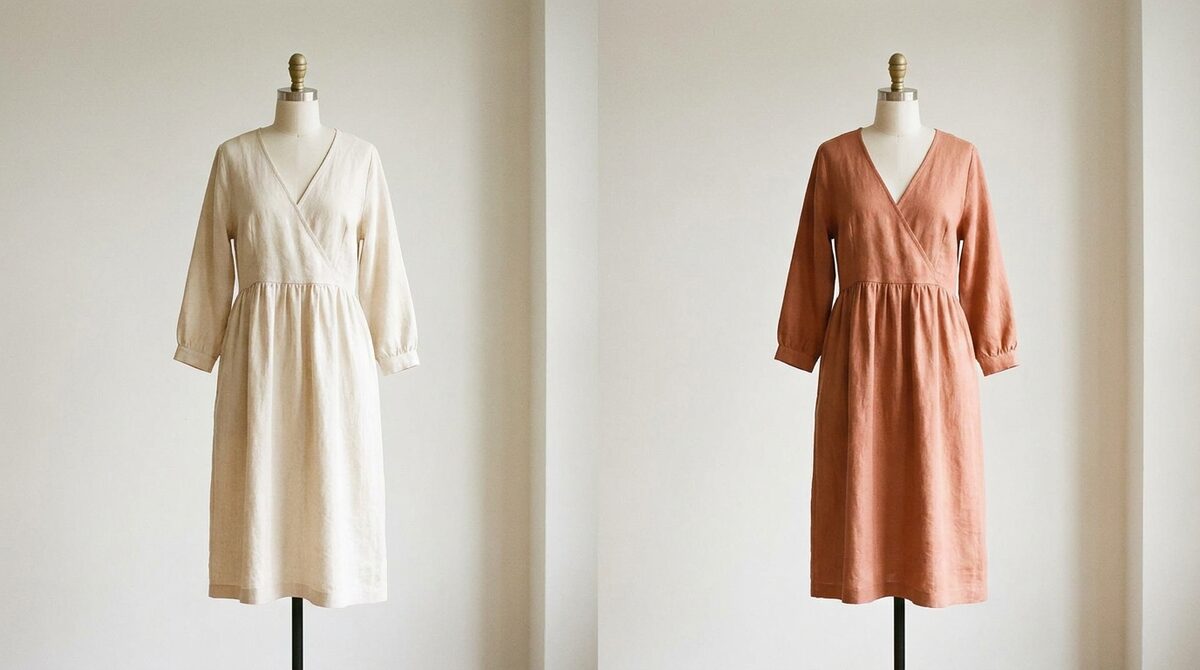
What a photo clothing editor can do
A modern photo clothing editor goes well beyond recoloring. It can clean up wrinkles, adjust fabric texture, remove stray threads, swap one garment for another, and generate colorway variants — all by isolating the clothing from the person and background. The AI understands garments as objects, so edits stay contained.
Common editing jobs, ranked
1. Recoloring
Pros: Fast, realistic, one shot to many colorways. Cons: Patterns need care. Verdict: The most reliable edit.
2. Retouching
Pros: Cleaner, more premium product shots. Cons: Overdoing it looks unnatural. Verdict: Essential for hero images.
3. Garment swapping
Pros: Test looks without a shoot. Cons: Realism varies on complex poses. Verdict: Powerful but check results.
| Edit | Difficulty | Store value |
|---|---|---|
| Recolor | Low | High |
| Retouch | Medium | High |
| Swap | High | Medium |
Editing your images vs. engaging shoppers
A photo clothing editor makes your catalog look better, which matters. But polished images still ask the shopper to imagine themselves in the clothes. Virtual try-on removes that imagination step by placing garments on the shopper's own photo. Our virtual fitting room explainer and complete try-on guide explain how that changes the buying experience.
Why the shopper-side edit wins
The reason is simple: confidence. When a shopper sees a garment on their own body — in the right color, on their frame — they buy more and return less. With fit and expectation driving roughly 70% of apparel returns, that confidence is worth 25–40% fewer returns and an 18–28% add-to-cart lift for stores using try-on.
Built for real stores
A store-grade try-on installs in about ten minutes, works from existing product photos with no 3D and no reshoot, and covers hands, face and body — rings, glasses, hats and clothes. Shopper photos are processed with zero storage and stay GDPR-safe.
Think of the photo clothing editor and the try-on as two halves of one system: one perfects the shelf, the other perfects the mirror. Stores that invest in both — clean catalogue images and believable on-body previews — give shoppers a frictionless path from admiring a garment to seeing themselves in it, and that path is where sales are won. Neglect either half and shoppers stall between a lovely product photo and the leap of imagining it on themselves — the exact gap a paired editor-and-try-on workflow is built to close.
Building a two-tool workflow
The most effective stores run clothing editing as a two-tool workflow. The photo clothing editor handles the shelf — clean, consistent, premium catalog images. The try-on handles the mirror — letting shoppers place those garments on themselves. Neither replaces the other; used together they cover the full journey from first impression to final decision.
What ties them together is realism. A beautifully edited garment deserves an equally believable on-body preview, which is why the try-on side leans so hard on body and pose understanding. When the shelf and the mirror both look real, shoppers move between admiring a product and imagining themselves in it with no friction — and that smooth transition is what converts.
Editing for production vs. editing for decisions
It helps to split clothing editing into two jobs. Production editing — recolouring, retouching, cleaning up wrinkles — makes your catalogue look premium and is essential work. Decision editing is different: it exists to help the shopper choose, and it only works when it happens on the shopper's own image. Most stores invest heavily in the first and neglect the second, then wonder why great photos still lose to returns.
A photo clothing editor is a production tool by nature. Virtual try-on is a decision tool by nature. They are complementary, not competing: you use the editor to build a beautiful, consistent catalogue, then use try-on to let shoppers place those garments on themselves. The stores that treat both as necessary — one for the shelf, one for the mirror — are the ones that convert browsing into buying.
A photo clothing editor is a powerful production tool. On Shopify, the durable advantage is moving that editing power to the shopper as a growth engine. 1Match shows garments on real buyers with strong image quality, captures native leads, feeds funnel analytics, and never stores a photo.
Frequently asked questions
What is a photo clothing editor?
A photo clothing editor is a tool that edits garments in an image — recoloring, restyling, retouching or swapping them — usually with AI. It isolates the clothing so you can change it without affecting the rest of the photo.
What can a photo clothing editor change?
Common edits include garment color, fabric texture cleanup, wrinkle removal, and full outfit swaps. Advanced AI editors can even place a different garment on the same person.
Is a photo clothing editor good for e-commerce?
For producing clean product images, yes. But to influence buying decisions and reduce returns, a store benefits more from a virtual try-on that puts garments on the shopper directly.
How is virtual try-on different from a photo clothing editor?
A photo clothing editor changes your images; a virtual try-on lets shoppers see garments on their own body. One is a production tool, the other a conversion and lead-capture tool.
 Install on Shopify